Recurring Tasks

Is there a way to make tasks recurring? Setting tasks to recur at regular intervals is extremely useful. ..or even groups or sets of tasks that need to be done on regular intervals.
Diane
-
Official comment

Hi Diane,
Essentially what you are describing is a repeating all day event. I know that sounds kludgy but allow me to explain.
We have heard this request before and it is actually implemented in SmartDay - but it is a very complicated issue because Tasks generally are not assigned to specific days; rather, individual tasks can be assigned individual due dates. With the desktop versions of Flo (Web and Mac, both of which will be available for beta in the near future), when you assign a due date to a task it will then appear in the calendar on that date. Same for dates on Notes. Likewise when you mark a task as 'done' it can also appear in the calendar. This is handy for tracking when you got things done. One of the advantages of this feature is that you can drag tasks from the list directly into different days of the calendar; that will simply create a due date for the task. Then when you look at the ToDo list and sort by 'due', you will see them all appear in order of when they are due.
The SmartDay implementation of recurring tasks is not date-dependent; it simply generates a new task when the previous one is marked as complete. But that can be confusing to some users.
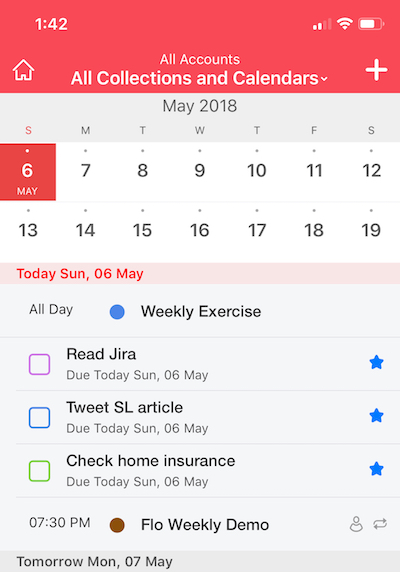
Here is what we would suggest: if you would like to create tasks that repeat on specific dates, those are actually events. You can create repeating all-day events and those will appear at the top of your calendar (i.e., they will not be attached to a specific time of day but they will be attached to the specific date). I hope this helps!
Comment actions -

Hi - I am with Diane with this one. Your date-driven To Dos are really good - and would be fantastic to have the same functionality for repeats. The option where the next To Do gets created when the current one is complete would mirror the way "Reminders" work in Apple - simple and powerful. Thanks
-
So I'm hearing two different needs. One is to have a task or todo that is done on a regularly scheduled basis. The other is a repeating task wherein the next repeat is automatically created when the current one is completed. Is that correct?
The regularly scheduled task is easily accomplished using repeating all day events. They shouldn't clog up your calendar if you only have a few of these (well, no more than they would clog up your todo list!) but you can always create a special calendar called "scheduled todo's" and then hide it so you don't see it.
Personally, I prefer to see my scheduled todo's.
-
Hi Michael - yes, you raise a good point - it would be good to see all the scheduled To Dos. At present, the iOS view of to dos by due date is very cool - is very clear. I guess that a re-occuring task may lead to a challenge in showing it in this view.
I will give "all day diary events" a try - see if it works.
Thanks for your feedback- appreciated.

Please sign in to leave a comment.
Comments
6 comments